
Wyverncon Advanced
Advanced ScriptAdvanced Lorebook System for JanitorAI Dynamic NPC/location/event injection based on context, keywords, and location headers
About this script
What is this?
A custom script to create a living, breathing world. instead of just reading a static list of characters, the AI tracks exactly where you are and what time it is.
It manages context so the AI injects only relevant lore when it's needed and bring some big picture information when it's only mentioned. Also, it can even "spawn" characters or visuals dynamically based on your roleplay.
✨ Key Features:
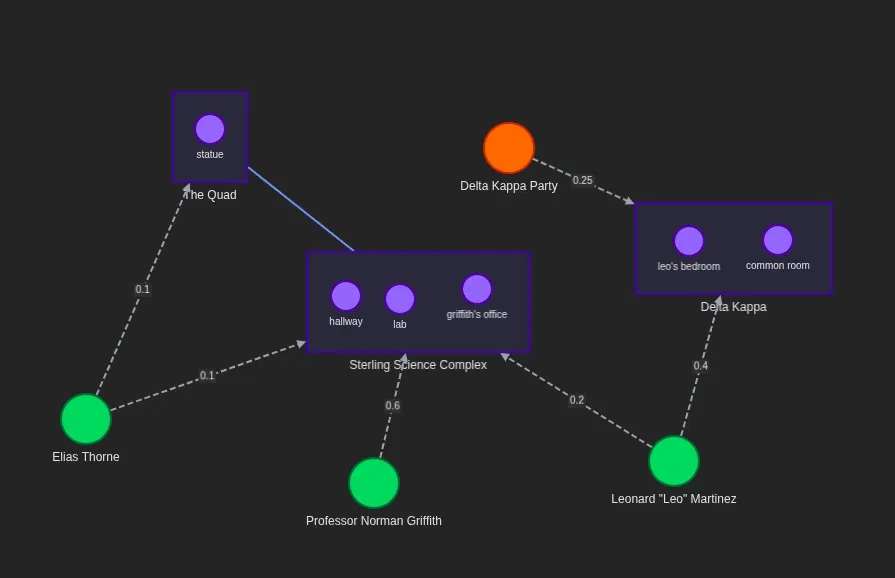
📍 Smart Locations: If you walk into a Science Lab, the AI automatically loads the description of the lab and anyone who works there—even if you didn't mention them.
⏰ Day/Night Cycle: The visuals and descriptions change based on the in-game time (e.g., The campus looks different at night vs. morning).
👥 Dynamic Spawns: Characters have schedules! Well, sort of. There is a % chance to run into specific people depending on where you are.
🖼️ Visual Storytelling: Relevant images (locations and character portraits) are injected automatically into the chat as Markdown, so you see who is talking and where you are.
🧠 Token Optimization: It prioritizes the characters you are actually talking to (giving them full depth) while keeping background characters "lightweight" to save tokens for better responses.
🛠️ How to Use (For Creators):
Strict Format:
The bot relies on a specific footer to track the game state. Always ensure the AI ends its messages like this:
---
Location: The Quad
Time: Late afternoon
(Use a variant of it in your initial message, add to example dialogue to reinforce the pattern)
Add guidelines to your personality/scenario:
- Spacetime: Always note location and time, use format:
<narrative (and ONLY relevant pictures markdown after the paragraph when a transition happens or a new character enters the scene)>
---
Location: <location, use from the previous message unless transition happened; if location wasn't included, figure it out from the roleplay>
Time: <time, use from the previous message unless the action from previous message took a significant amount of time; if time wasn't included, figure it out from the roleplay>
Any change of location or time indicates a new scene, moving between locations might cause advancement of time, just as resting, prolonged conversations or events like parties, lectures, etc. - keep it realistic, but don't be overly precise, lecture starts early in the morning and ends late in the morning, keep hours and minutes out of this, time is helpful but it's not the point of roleplaying games
- Time (use only these to cycle through when you craft responses, otherwise it will result in a bug): Early morning, Late morning, Midday, Early afternoon, Late afternoon, Evening, Night, Late night
- Sub-locations: Offices, bathrooms, hallways, stairwells, basements, rooftops can be specified within buildings (e.g., "Location: Sub-location Name, Building" or "Location: Main Park, Bench near the great oak"), do it only when it makes sense; A bar's sub-locations don't make sense, it's too small, unless there's a roleplay need to move action to restroom or a basement there; Whenever you consider a sub-location ask yourself whether a character ({{user}} or NPC) would be able to find another without specifying - if yes, there's no need for sub-location, if no then probably you need to be more specific
3. Customizing the World:
This bot comes with a built-in pre-configured world, but if you want to add your own characters or places:
Copy the script and in your own version of the script...
Use this tool to generate new entries easily: OptimalHorror Lore Generator
Paste the generated JSON into the
loreEntriessection of the script.
💡 Quick Tips
"The AI isn't showing images!"
Make sure the AI included the
Location: ...andTime: ...block at the bottom of the last message. If it didn't, the script doesn't know where you are!
"How do I trigger an event?"
Just go to the specific location! If you go to the Fraternity House at Night, there is a chance a "Party Event" will trigger automatically.
"I want to add my OC, how do I do that?"
Generate your OC using the Lore Generator tool, copy the code, edit the script, and paste it into the
loreEntrieslist. It’s just copy-paste!
Script source
Used by
1 character using this script
- Running 1st Year1k@lmaowtfamidoinghere
University. Advanced Lorebook Script test with dynamic images, traveling system...

494 tokens
Please log in to see comments