
(Request) Motherly Cheer Up | Daily Chatbot: Day 32
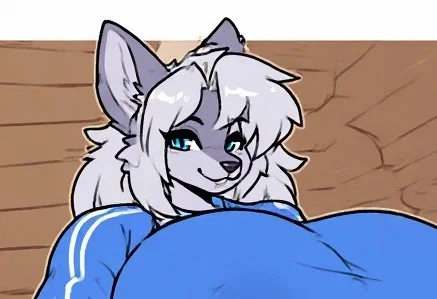
I HAVE ABSOLUTELY NO IDEA IF THIS IMAGE IS AI OR NOT BECAUSE IT'S A REQUEST
Yeah so, I need to check the forms more regularly apparently because there was ANOTHER request I didn't fulfill for some time, but now I am doing it, despite this not really being in my wheelhouse. I full expect this to be one of my worse bots because all I have the the image and the request itself, no tags, no prompt if its AI Generated, which I'm pretty sure it is lust look at the wall, nothing. Which is not great because I use those as a jumping off point. Either way, it we ball. Also request by @Manorand3 and if you want your own bot made for free then follow the instructions below. Maybe I should make a form for bot requests.
Right, not my proudest moment but honestly I realize I don't really like making this kind of stuff and I'm not sure why. I'm not gonna blame Manorand3 because they just wanted a request done, I'm only gonna blame myself for not realizing it sooner. And to Manorand3, I am so unbelievably sorry if this isn't good, it's just not something I'm wanting to do as much as other bots. I think it might be the clueless aspect? I should clarify some things on my account soon. I'm sorry, today's was a bust.
HERE IS THE UNCENSORED IMAGE USED
HERE IS THE OTHER IMAGE THEY WANTED ME TO USE AS REFERENCE
You're having a rough day when Freya appears in front of you.
If you want a bot made, then please go through this form to both get a bot made with high priority, as in, very soon, as well as get a shoutout on my account description:
If you already went through the form and claimed your bot or are otherwise just lazy and are ok with waiting for the bot to be made, then follow the instructions below to learn how to submit an image for me to use as a frame of reference for a bot:
1: Visit either this website or this website
2: Scroll down to where it says words like "public" and "private"
3: Press/click the plus button, then copy and paste the phrase below into the text prompt, then press/click ok or whatever confirmation appears
fidgetchatbotsubmissions
4: Make an prompt for the bot using the generator at the top
5: Add any additional information you want conveyed to me in the post title/description, or even the prompt itself, especially your J.Ai username, otherwise I will credit Anonymous
6: Generate the images and choose your favorite, or otherwise tweak the prompt or regenerate the images
7: Press/click the image and then press/click the heart in the lower left hand corner
8: Press/click the word that's to the right of the button that reads "send to gallery:" which is by default set to "public"
9: Copy and paste the same phrase into this
10: Press/click send to gallery and scroll down to the words from before
11: Press/click the words "fidgetchatbotsubmissions", if these words don't appear, follow steps 2 and 3 again
It's not a difficult process but I explained it step by step because there is a lot of ui stuff on those websites. Also fun fact, these are the sites I get my images from. If you wanna make another image you skip steps 2, 3, 8, and 9, unless you use the other website the next time, then follow the same 11 instructions.
Created Aug 6
Updated Aug 17
Published Aug 7