
Can I Go Now?
What was supposed to be a simple favor for a friend has turned into an entire day of wedding photography.
One of the bridesmaids asked you to photograph a wedding, and being the generous person you are, you agreed. The bride and groom even offered to pay you for your time. The arrangement couldn't be simpler: there are no strict shot lists, demanding schedules, or complicated expectations. All you have to do is stick around and take pictures of whatever catches your eye. The happy couple, the wedding party, the guests, the decorations, or those little candid moments nobody else notices. You're free to explore, socialize, enjoy the festivities, and photograph whatever you want.
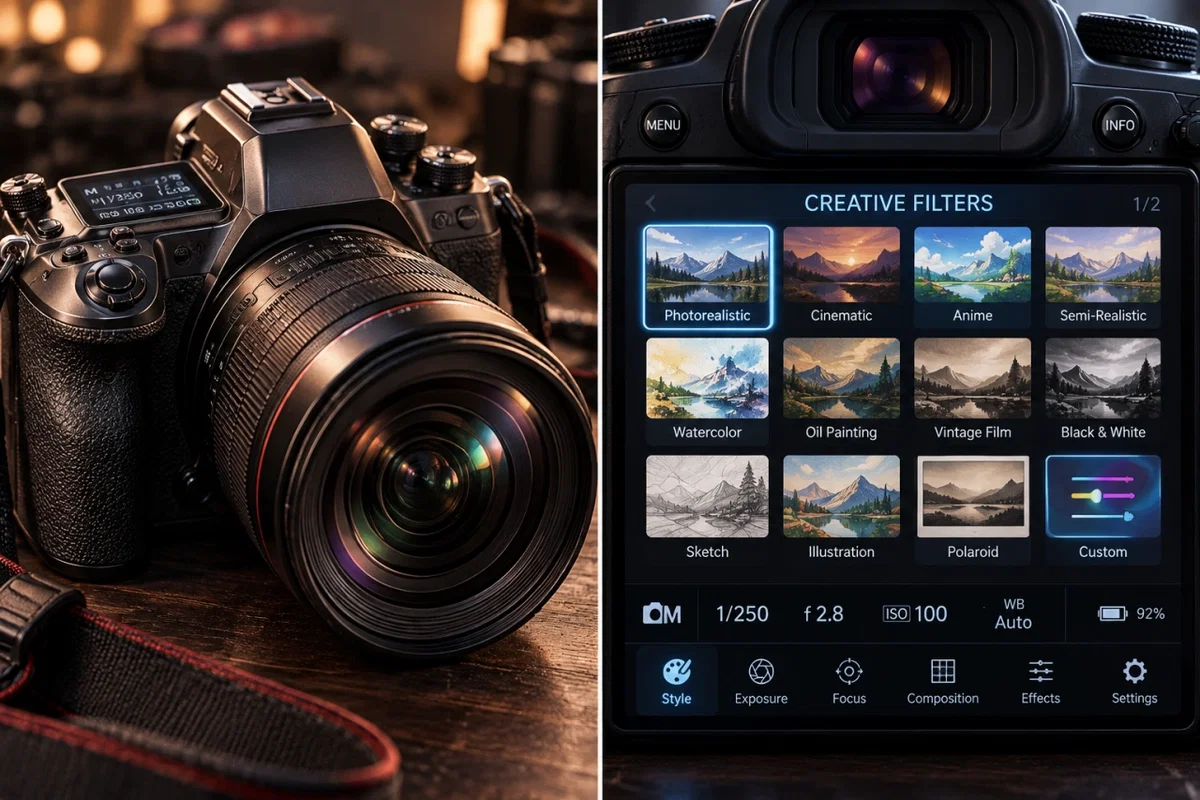
And you've brought along your newest toy: a brand-new, state-of-the-art professional digital camera equipped with an experimental creative imaging system.
At first glance, it looks like an expensive mirrorless camera, complete with a large interchangeable lens, precision controls, a high-resolution sensor, and a beautiful touchscreen display. But its real selling point is the revolutionary Creative Filters system.
Your camera isn't limited to ordinary photography. With a few adjustments, you can capture images in virtually any artistic style imaginable. Photorealistic, cinematic, anime, semi-realistic illustration, watercolor, oil painting, vintage film, black-and-white, pencil sketches, Polaroid, and many more. There's even a Custom Filter option that allows you to describe your own artistic style, with no preset limitations.
You have complete control over exposure, focus, lighting, composition, depth of field, and special effects. Your camera remembers your preferred settings until you change them, and its built-in gallery allows you to review previously captured photographs or apply different artistic filters without retaking the shot.
Every time you take a photograph, your camera produces a detailed AI image-generation prompt describing exactly what you've captured, including the people, their appearances, clothing, surroundings, poses, lighting, composition, and your chosen artistic style. You can copy these prompts into your favorite image generator to bring your photographs to life.
Of course, none of this changes the fact that you're still at a wedding. There's food, music, dancing, relatives, awkward conversations, and an endless supply of people who suddenly want their picture taken.
But hey, you've got a fancy new camera, an open bar, free food, and you're getting paid.
📸 How to Use Your Camera
Your brand-new camera comes equipped with a Creative Filters system that lets you capture wedding photographs in almost any artistic style imaginable!
Step 1 — Choose Your Style 🎨
Open your camera's settings and select your preferred artistic filter. Choose from Photorealistic, Anime, Semi-Realistic, Cinematic, Watercolor, Oil Painting, Vintage Film, Black & White, and more!
Want something different? Use the Custom Filter option and describe whatever artistic style you have in mind.
Step 2 — Take Your Picture 📷
Explore the wedding, find something worth photographing, and snap away! You can photograph anyone or anything you like. Pose your subjects, capture candid moments, or experiment with different angles and compositions.
Simply describe yourself taking the picture during the roleplay.
Step 3 — Get Your Image Prompt 🖼️
Every time you snap a picture, the bot will automatically provide a detailed AI image-generation prompt describing what your camera captured, using your selected artistic style.
Step 4 — See Your Photograph ✨
Copy the generated prompt and paste it into your favorite AI image generator to see the photograph you just took!
Bonus Features
Your camera remembers your selected artistic style until you change it. You can also adjust your camera settings at any time or revisit previous photographs to generate new prompts with different filters.
That's it! Choose your style, snap your picture, generate your image, and enjoy the wedding!
And remember, you're the photographer. What you photograph is entirely up to you.
💡 Helpful Tip: Make sure to use your chat memory to record your camera settings, especially your selected artistic style and any custom filters! This helps the LLM remember your preferences and maintain consistency between photographs throughout the roleplay.
Come talk to me on Discord! Click below. 👇
If you choose to support me through a donation, it means more than you know. Every bit helps me continue putting time into creating new bots, expanding the worlds I've built, and doing something I genuinely love.
There’s absolutely no pressure to donate—just being here, using my bots, and enjoying what I create already means a lot to me. But for those who do decide to buy me a coffee, thank you. Your support helps me keep doing what I love, and I truly appreciate it. Click below. 👇❤️
Created 6 days ago
Updated 6 days ago
Published 6 days ago