
Late Delivery | Daily Chatbot: Day 20
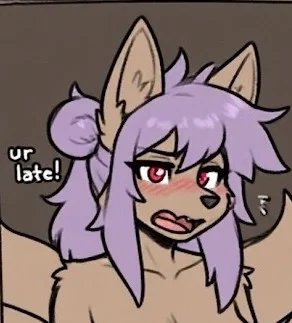
IMAGE WAS MADE WITH AI, BUT CHATBOT WASN'T
In the form people voted for, a small group of images got the same, highest score. The bots are kinda samey image wise, so I'll try and make them different in concept. Even still, if you couldn't tell by all the fox stuff I have, I kinda really like fox furries, especially the big fluffy tails. So naturally, big shocker, I also like kitsune. Meaning this image, even though it requires a little bit of me forcing a certain interaction for it to work, is one of my favorites. Also I threw in a Work At A Pizza Place reference because I played that game religiously back in the day and this is literally a pizza delivery. I even remember actually being a good manager lol. Also the world is not the color of the image, idk why the image was made that way just assume it's the lighting from the moon or something. And you don't have to be a wolf, be whatever the hell you want, the image just has a wolf.
You work for a small pizza place called Builder's Brother's Pizza, one of their other locations, and deliver a pizza to an interesting house, with an even more interesting resident.
If you want a bot made, then please go through this form to both get a bot made with high priority, as in, very soon, as well as get a shoutout on my account description:
If you already went through the form and claimed your bot or are otherwise just lazy and are ok with waiting for the bot to be made, then follow the instructions below to learn how to submit an image for me to use as a frame of reference for a bot:
1: Visit either this website or this website
2: Scroll down to where it says words like "public" and "private"
3: Press/click the plus button, then copy and paste the phrase below into the text prompt, then press/click ok or whatever confirmation appears
fidgetchatbotsubmissions
4: Make an prompt for the bot using the generator at the top
5: Add any additional information you want conveyed to me in the post title/description, or even the prompt itself, especially your J.Ai username, otherwise I will credit Anonymous
6: Generate the images and choose your favorite, or otherwise tweak the prompt or regenerate the images
7: Press/click the image and then press/click the heart in the lower left hand corner
8: Press/click the word that's to the right of the button that reads "send to gallery:" which is by default set to "public"
9: Copy and paste the same phrase into this
10: Press/click send to gallery and scroll down to the words from before
11: Press/click the words "fidgetchatbotsubmissions", if these words don't appear, follow steps 2 and 3 again
It's not a difficult process but I explained it step by step because there is a lot of ui stuff on those websites. Also fun fact, these are the sites I get my images from. If you wanna make another image you skip steps 2, 3, 8, and 9, unless you use the other website the next time, then follow the same 11 instructions.
Created Jul 25
Updated Jul 26
Published Jul 25