
How To: Survive Talking WITHOUT Asterisks
by:@Sandere
So, you might've noticed that I, and some other creators, have stopped using asterisks in their intro messages.
My reason for not using asterisks for narration; the AI kept using them incorrectly, put one at the beginning and forgot the one at the end, or I like to use the asterisk text (Italics) for thoughts instead of narration.
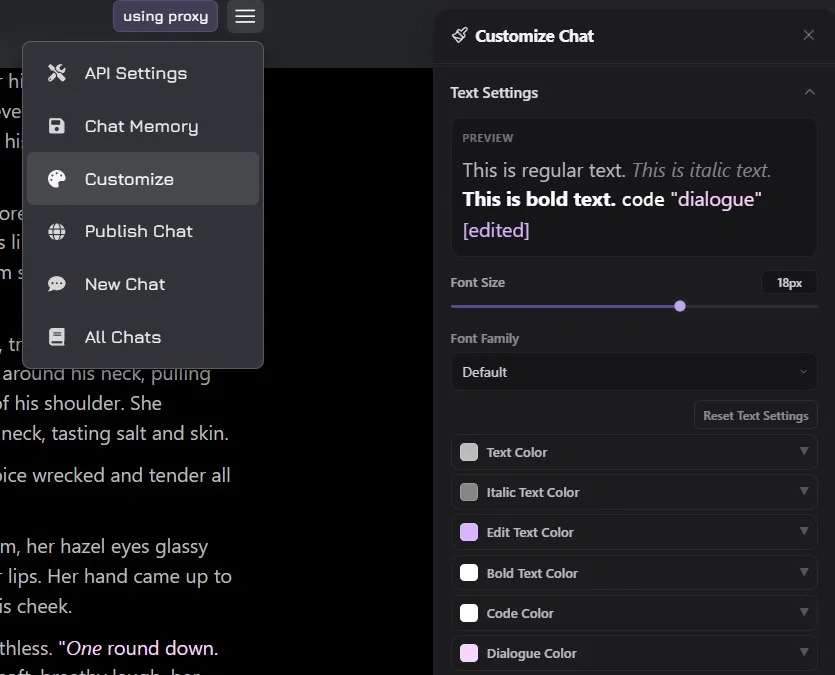
Now, I get that an entire block of white text looks awful to read or to find the dialogue. Which is why this awesome tool exists inside of the chat: CUSTOMIZE
"Customize" can be found by tapping/clicking the three horizontal lines in the top right of a chat, and then scrolling down a little under the "Customize Chat" window.
They even give you a handy little example of what is coloured which way. Neat, huh?
Now, of course, for your troubles regarding my new intros, the only three you'll have to look at are TEXT, ITALIC TEXT and the big one; DIALOGUE COLOR.
I like my TEXT, or narration text, in a darker colour; since, you know, the biggest part of chat is going to be narration. Nice and soft on the eyes.
ITALIC TEXT could just stay at the default, or make it darker than the TEXT. I'll still use it for thoughts, just like most creators that take on this format. Even AI tends to use ITALIC TEXT for thoughts natively, so keep that into consideration.
And now for the kicker, the DIALOGUE COLOR. Since most of my chatbot interactions are with female characters, I chose a soft pink for ambient reading. Makes the character feel more... girly, I guess. But obviously, since you are chatting with the bot, this is also the most important part of each response. Hence, I recommend the brightest colour going to DIALOGUE COLOR.
And now you are ready to survive chatting with my newer generation of bots using a format that avoids using asterisks for narration.
THANK YOU FOR LISTENING TO MY TED TALK. 'KAY, BYE!
---Want To Show Support?---
My Community Server: Discord
If you want to support my creative endeavours, you can leave a much appreciated tip.
My Donation Page: KoFi
Created Jul 6
Updated Jul 6
Published Jul 6
proxy allowed