
privating some bots
some of my bots got permanently deleted for violating image guidelines or something idk. gonna temporarily private some bots so they don't get deleted too
(also, come in here to see how I make my thumbnails)
The Monster Almanac got deleted, apparently for violating some sort of guidelines. I'm not sure what was wrong with it. If you know why it was deleted, please tell me. This is what the thumbnail was: https://files.catbox.moe/ey56l8.jpg
It's sad for me, because it's one of my favorite bots I've made, definitely one I was very proud of creating. I'd upload it again, but I'm not sure what was even wrong with the original image.
Also, on my alt account, the Mandatory Appointment with your Emotionless Body Inspector got deleted too, also for thumbnail violations. I'm really confused with that too, because it shows literally nothing sexual, even less than the FemPOV thumbnail: https://files.catbox.moe/3w2w6d.jpg
its a bad day for the gooners
Other bots I privated (for now):
Demi-Human Breeding Farm
Animal Girl Breeding Zoo
Stuck in a Glory Wall
Monster Girl Almanac
All the BitchwWorld bots
XXX Erotic Wrestling
Multiversal Glory Wall
Mysterious Girl Sends You Nudes
Anyway, since I'm posting, I figured I'd show you all how some of my thumbnails are made!
First of all, they are all mostly AI generated using a program on my computer called ForgeUI. It's a program that lets me not only generate images using a prompt, but also edit smaller parts of images as much as I want. I can also take an image and use it as a basis to create a new image with a similar composition. I also use a decent amount of photoshop for editing, color correction, and text.
Here's an example to show how I can create a nice thumbnail:
My first step in creating an image is to figure out a composition. I usually have a composition in mind when creating a thumbnail, a vision for how I approximately want it to look. My images are AI generated, so I'm limited by what the AI generators can do, although I'm also limited by my artistic vision and my imagination.
I wanted a beach composition of 3 different women in bikinis, sitting or lying under the shade of an umbrella, and I wanted them each to have specific poses, appearances, and expressions.
So after a bit of messing around, I decided on a prompt to feed the AI. This was what I went with:
(from above:.7), perspective, 3girls, multiple girls, mature female, beach, beach umbrella, beach towel, beach chair, bikini, side-tie bikini bottom, frilled bikini, front-tie bikini top, tan, lying, sitting, hugging own legs, looking at viewer, ocean, shade, picnic basket, beachball, masterpiece, best quality, amazing quality, very aesthetic, absurdres
(I'm not going to go into super big detail about how to prompt or generate images, I'm just giving you a quick overview of my image generating process.)
These are the sort of images it gave me:
The purpose of the first step is solely about finding a general composition. The details are added later.
I ended up liking this image decently enough:
For the artstyle, I wanted something hentai-esque, something sexy and colorful. So I took the image above and generated a bunch of images with the exact same prompt and seed, except for one change: I added a different artist style tag for each individual image. The computer program I use lets me do this in a large batch, so all I have to do is have a list of artist style tags separated by commas, and the program will generate me 1 image with each artist tag.
This is what the above image looked like with different artist style tags:
These days, I have a list of about 70 artist tags that I test out.
Next, I pick all the art styles that I like. Maybe 5-10, depending on the image. Sometimes, all I need to do is narrow it down to one artstyle to choose. But typically, I like to mix and match artstyles. I'll generate images with 2-3 artist tags, and see which combinations look nice.
For this thumbnail, the combination I ended up picking was a mix of these two, takeda_hiromitsu and yanje:
Which ended up creating this artstyle:
Now, I liked this artstyle a lot, but I wasn't in love with the composition. So I set my computer program to generate a shit ton of images with this artstyle and prompt:
Then, I sifted through hundreds of images to find the one that spoke to me (sometimes it takes hundreds, sometimes just a few dozen). This is the one that fit my vision the most:
It's perfect, right?
Nah, it looks like shit. But that's ok, because all I'm doing is finding a composition. The next step is adding the fine details.
First, I extended the composition on the right and top (using the computer program):
Then, I took this image and did a sort of "generic upscale" to clean it up. (which I then threw into photoshop and tilted slightly, then threw back into the Ai generating program)
For the next step, I wanted to change just 1 character and make her more detailed and unique. So I changed the prompt to add details about just the blonde on the right:
(from above:.7), perspective, 3girls, multiple girls, mature female, beach, beach umbrella, beach towel, beach chair, bikini, side-tie bikini bottom, blue bikini, front-tie bikini top, tan, lying, sitting, hugging own legs, looking at viewer, ocean, shade, picnic basket, beachball, feet, large breasts, goth, blonde hair, makeup, colored tips, earrings, navel piercing, gyaru, tanlines, wavy hair, scowl, clenched teeth, clenched hand, yanje, takeda hiromitsu, masterpiece, best quality, amazing quality, very aesthetic, absurdres
Then, I do something called inpainting. Basically, I draw a mask over whatever sections of the image I want the AI to regenerate. Then, the AI will change only that portion of the image, while keeping the rest the exact same. It looks something like this:
I can set certain sliders in the computer program to determine whether the image changes a lot from the original, or just a bit.
Here is a result I liked:
Then I changed the prompt again, this time to something milfier. I put a mask over the woman in the back, and genned more images until I got this:
Then I just fixed up her legs:
Next, I inpainted different small things, this time using a special setting that allows them to be rendered in greater detail. I fixed up the milf's face, legs, and some smaller things in the background around her:
Then I did the same thing for the blonde, fixing up the little things and adding more detail:
And again for the girl on the left:
During these phases, I generate a lot of images that are bad. But as long as I can generate one good one, that's all I need to proceed to the next step. And if a small detail looks weird, like a foot looking strange, I can inpaint just the foot until even that is fixed.
I took the image above, did some minor recoloring to make the left girl's skin darker (using photoshop), and then AI upscaled the image:
Finally, I took this image into photoshop and did some color correction to make the image "pop". I also added some text using Photoshop:
And that was it for the thumbnail. Phew.
I made it sound a bit more complicated than it actually is. At the end of the day, it's just a manner of having a vision and taking the time to add in all the small details you want. The AI does the heavy lifting.
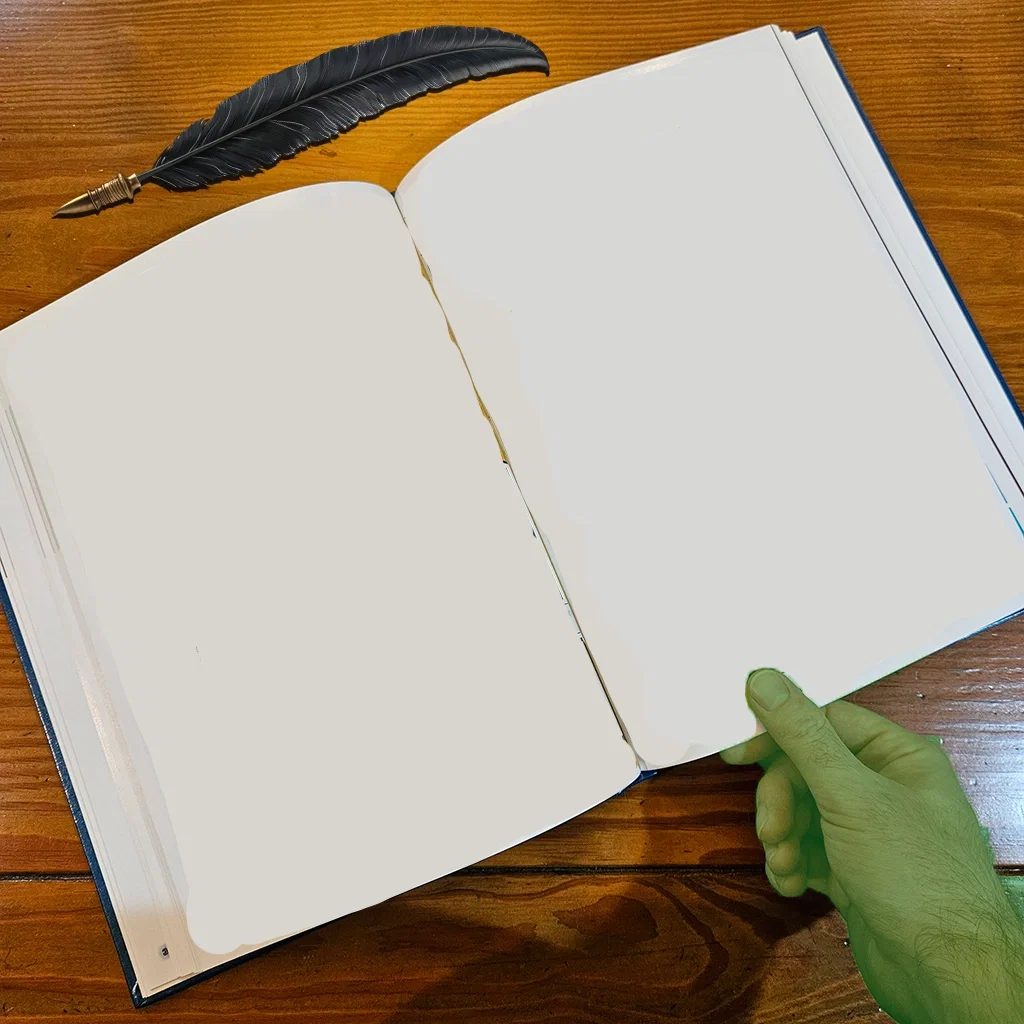
I can also use a real life reference pic to create a composition. That's what I did for the Monster Almanac. This is just a picture of me holding my old school yearbook (blurred for privacy, of course):
https://files.catbox.moe/f4yg95.jpg
(NicholasCS hand reveal!? 🤯)
Then I just used Photoshop to add a png of a feather, white out the pages, and color my hand orc green.
Throw this into the Ai computer program, add a prompt an orc holding a book, and you get something like this (after some trial and error):
A bit more editing and inpainting, and you get a beautiful full image:
And after some Photoshop magic, you get this as a final result (NSFW):
https://files.catbox.moe/9c5aj4.png
Pretty nice, huh?
Here are a few more quick examples of those initial compositions I use to edit into final thumbnails:
First, Pillory Punishment:
The final thumbnail:
Then I used this thumbnail to make the female monster version:
And the final result (after flipping the image)
Demi-Human Mixup-MashUp
Final thumbnail:
Your Cheating Stepmom
(I took a photo of my wallet and Nintendo 3DS lol)
Which eventually transforms into this:
Crystal - Junkie
Final:
Cerberus Triplets
Final thumbnail:
Wife Correction Facility
Final:
Clanker!
Project V.I.R.G.I.N.
Final thumbnail:
Sneak peak of upcoming bot (if I feel like writing it)
Final Thumbnail:
anyway, that's all lol
Created Sep 18
Updated Sep 18
Published Sep 18